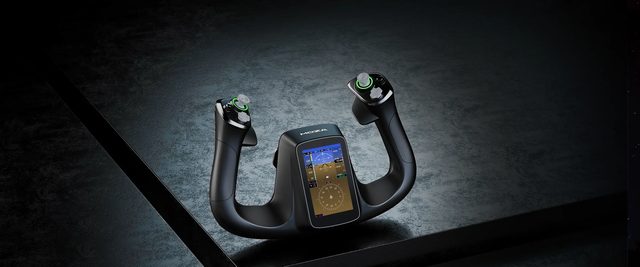
MFY Proflight yoke with a 4.3-inch touchscreen and 26 inputs
A yoke with a 4.3-inch screen
- 4.3inchtouchscreen
- 26inputsprogrammable inputs
- 480×800pxscreen resolution
- 1.2kghandle weight
1-month GEEKSHOP warranty · Pre-order — no payment now
The instruments moved into your hands
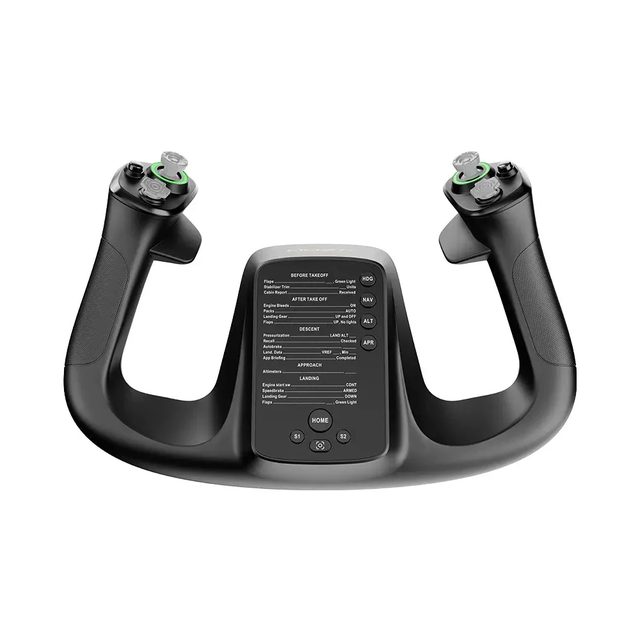
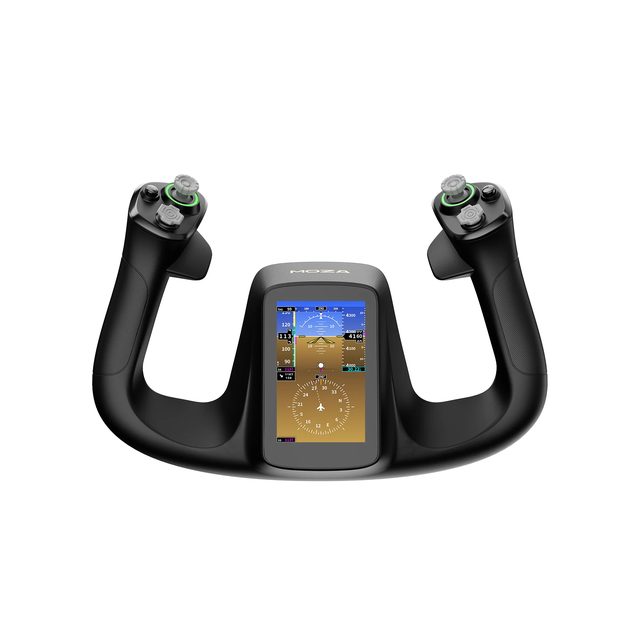
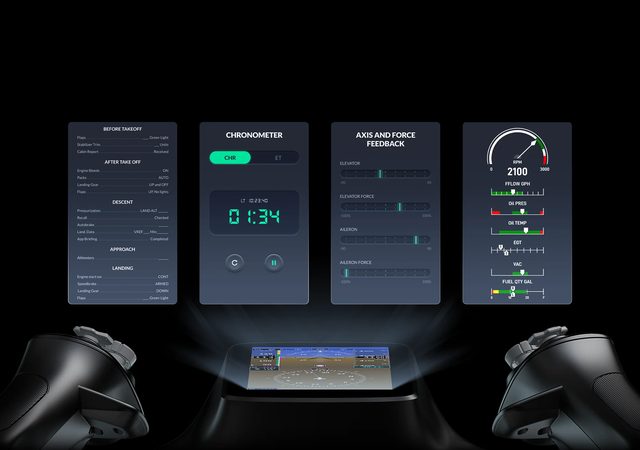
The MFY Pro is MOZA's flagship flight-sim yoke handle. It is a handle only: it mounts on a MOZA AY90 or AY210 force feedback yoke base through the aluminium quick release and does not work on its own. The shape follows the yokes of modern airliners, so the grip and the position of every control stay familiar through all phases of flight. A 4.3-inch 480 × 800 touchscreen sits in the middle of the handle. It shows PFD data, engine instrumentation, checklists, a chronometer and an axis and force monitor. There are 26 programmable inputs in total: two 8-way hat switches, two Hall effect thumbsticks, two LB/RB bumpers and two triggers. MOZA Cockpit can map the triggers and thumbsticks either as analogue axes or as plain buttons, with separate profiles for different aircraft. The housing is reinforced composite, the button caps are ABS and the quick release is aluminium alloy, so the handle comes off and goes back on without tools and without play. It measures 142.5 × 202 × 313 mm and weighs 1.2 kg. The 16.7-million-colour RGB lighting can be matched to the rest of the cockpit. Before ordering, make sure you have an AY90 or AY210 base — it is sold separately.
- 01
Instruments where your hands are
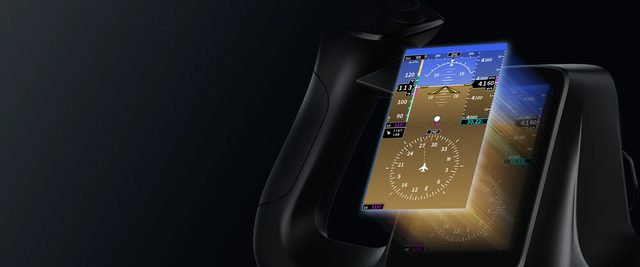
The 4.3-inch 480 × 800 touchscreen sits in the middle of the handle — exactly where your eyes already go on approach. It carries PFD data, engine instrumentation, checklists, a chronometer and an axis and force monitor, so part of the panel stops competing for monitor space. MOZA says the interface and checklist customisation will be extended in future firmware updates.
- 02
26 inputs, a profile per aircraft
Two 8-way hats, two thumbsticks, two LB/RB bumpers and two triggers add up to 26 programmable inputs. Triggers and thumbsticks can be mapped as analogue axes — rudder, braking or view control — or as plain buttons such as push-to-talk. Mappings are stored as profiles, so moving from a Cessna to a heavy airliner is a profile change rather than a fresh setup.
- 03
Hall effect: no drift, no wear
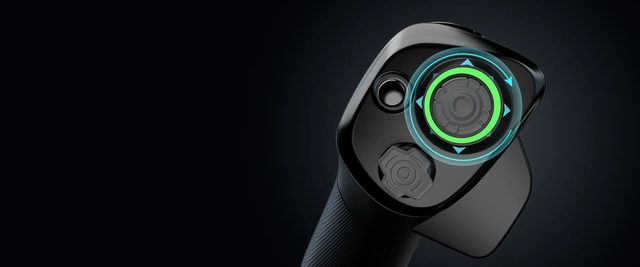
Both thumbsticks run on contactless Hall effect sensors. Magnetic position sensing does not wear out the way potentiometer tracks do, and it does not develop the drift that makes a view slowly creep to one side. On long flights and fine camera work that difference shows.
- 04
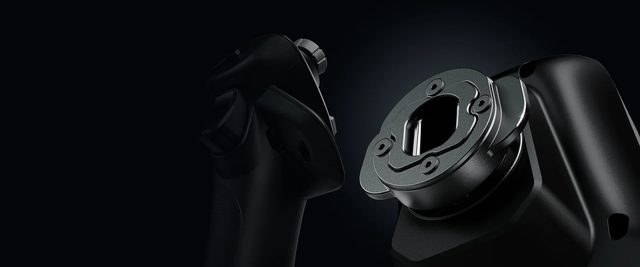
An aluminium quick release
The handle seats on the base through a precision-machined aluminium alloy quick release. It comes off and goes back on without tools, and the joint stays rigid and play-free even through aggressive manoeuvres. If your cockpit keeps more than one grip, swapping takes seconds.
- 05
What else you need
The MFY Pro is a handle, not a complete yoke: it needs a MOZA AY90 or AY210 force feedback base, which is what generates the forces you feel. Those bases are mounted to a desk, and MOZA sells table clamps for them separately. Plan the set in advance — the base and the clamp are separate line items.
Compatibility
The handle is made for the MOZA AY90 Yoke Base and MOZA AY210 Yoke Base force feedback bases and attaches through MOZA's own aluminium quick release. The base and the MOZA Table Clamp For Yoke are bought separately. Buttons, axes and profiles are set up in the MOZA Cockpit app on PC.
- A 4.3-inch touchscreen built into the yoke
- 26 programmable inputs and per-aircraft profiles
- Hall effect thumbsticks — no drift, no wear
- Aluminium quick release: tool-free swaps
Specifications
- Model
- MOZA MFY Pro Yoke Handle
- Type
- Yoke handle for a force feedback base
- Base required
- MOZA AY90 Yoke Base or MOZA AY210 Yoke Base
- Platform
- PC (configured in MOZA Cockpit)
- Screen size
- 4.3 in
- Resolution
- 480 × 800
- Total output signals
- 26
- 8-way hat switches
- 2
- Hall effect thumbsticks
- 2
- Bumpers (LB/RB)
- 2
- Triggers
- 2, as axes or buttons
- Lighting
- Customisable RGB, 16.7M colours
- Housing material
- Reinforced composite
- Quick release
- Aluminium alloy
- Button caps
- ABS
- Dimensions
- 142.5 × 202 × 313 mm
- Weight
- 1.2 kg
- Configuration
- MOZA Cockpit: buttons, axes, triggers, thumbsticks, profiles
- On-screen data
- PFD, engine instrumentation, checklists, chronometer, axis monitor
- Part number
- AS021
- EAN
- 6973137271299
Specs as published by MOZA
Questions
Can the MFY Pro be used without a base?
No. The MFY Pro is a yoke handle: it mounts on a MOZA AY90 Yoke Base or MOZA AY210 Yoke Base through the aluminium quick release. The base is bought separately.
What does the 4.3-inch screen show?
PFD data, engine instrumentation, checklists, a chronometer and an axis and force monitor. The screen runs at 480 × 800. MOZA says the interface and checklist customisation will be extended in future firmware updates.
How are the buttons, thumbsticks and triggers configured?
In the MOZA Cockpit app on PC. There are 26 inputs: two 8-way hats, two Hall effect thumbsticks, two bumpers and two triggers. Thumbsticks and triggers can be mapped as analogue axes or as buttons, and mappings can be saved as separate profiles for different aircraft.
How does the preorder work?
The item is sold on preorder, opening on 18 November 2026. Once a GEEKSHOP manager confirms the order, delivery takes about a month.
The YouTube video loads only after you click.
No customer reviews yet — and we do not make them up.
MFY Pro
We do not take payment now. A GEEKSHOP manager will contact you to confirm availability, the delivery date and payment.
1-month GEEKSHOP warranty · Delivery across Uzbekistan — quoted by the manager